


Too many passwords to remember? Passwords too complex?
PassHelper is not like other password managers. Small, simple, fast.
- Supports Microsoft SQL database (Express through Multi-Server Clusters, version 2008 and newer).
- Passwords and PIN's stored using FIPS compatible encryption. FIPS 140-2 is currently supported by Windows, once Windows supports FIPS 140-3, it will be available at no additional charge.
- PassHelper runs on IIS, client can be any modern web browser (mobile or desktop).
- For each item, store a Description, Username, Password, URL, PIN, Comments and up to five User Defined Fields.
- User Logins can be Active Directory integrated or locally stored.
- Active Directory Secondary Accounts supported to reset administrator accounts when they are needed.
- User Scratchpad is an encrypted note area each named user can store whatever notes they want to keep (server names, door codes, etc).
- Import and Export common CSV formats and an Encrypted Zip for Disaster Recovery purposes.
- No software maintenance or other ongoing costs, buy once, use forever. Upgrades are included forever! We do reserve the right to charge for new features that are added (if you want to us them).
- Need to upgrade your level from Home to Business or Business to Enterprise? Just pay the difference of what you have paid so far to what you want to upgrade to. 100% investment protection.
Keep it Local, Not Cloud
Every day almost you hear about another website or cloud provider being hacked or going out of business. Keep your data local where you control it.
Strong Encryption/Auditing
The first time you run PassHelper it creates numerous random keys to store your data with. Who has access to your data? Only you.
PassHelper keeps track of every login, every update and delete and every time a password or PIN is accessed.
Performance Matters
If it takes you two minutes to log into your password manager, it's lost time and money. We get you in to your data quickly so you can do your job.
Don't Mix Up Your Data
Need to keep passwords for different groups of people? Create groups and assign those groups to items and users so people only have access to items they need access to. Users can belong to multiple groups so Service Desk might only see some passwords, the System Administrators can see more and your Cyber-Security folk have their own passwords that nobody else has access to. Users can also enter their own items that only they can access.
Active Directory Integration
Who wants to remember a master password to access your other passwords? If your site uses Active Directory, users can use their existing network credentials to authenticate to PassHelper.
Don't Lock Your Data in a Vault
Some password managers try to lock you into their platform with no way to export your data. We let you export all or part of your data anytime, of course we also give you many ways to import data from other sources - which we are sure you'll use more often!
Several Options for Licensing:
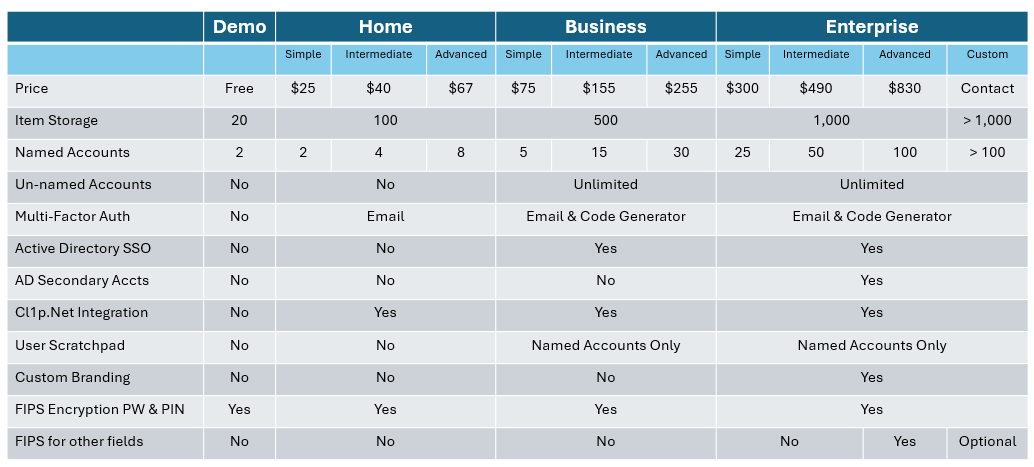
PassHelper v3 was officially released January 1st, 2024 and is in limited Alpha Testing! PassHelper has been helping people like you for over 10 years. With version 1 released in 2010, the first version was a windows executable that was a solid performer. Never heard of it? That doesn't surprise us, we really didn't promote it much and it was marketed towards home use. Now with v3 going web browser based, it's perfect for MSP's and other support organizations! For more information or to request a formal quote, email passhelper@nevets.net